Framework For System Design Interviews
A repeatable 7-step process for any design question — from requirements to trade-offs.
Problem it solves
- Candidates draw random boxes without clarifying scope — interviewers cannot tell if you understand the problem.
- Without estimation, you cannot justify cache, sharding, or queue choices with numbers.
- Unstructured answers run out of time before deep dives — or skip trade-offs entirely.
- A framework turns any prompt (“Design Twitter”, “Design a rate limiter”) into the same reliable flow.
Why It Matters
- Interviewers at product companies explicitly grade structured thinking, communication, and trade-off judgment.
- The same 7 steps work for 45-minute onsite rounds and 60-minute virtual loops.
- Pairs with Scale From Zero To Millions for *how* to evolve architecture once high-level design is drawn.
- Reduces panic: you always know what to do next in the interview.
What interviewers evaluate vs what candidates often do
| Aspect | Interviewer wants | Common mistake |
|---|---|---|
| Requirements | Ask clarifying questions; state assumptions | Assume features and scale silently |
| Scale | Back-of-envelope QPS, storage, bandwidth | Say “millions of users” with no math |
| Design | Simple first diagram, then evolve | Over-engineer with 15 microservices on minute 2 |
| Depth | 1–2 components explained in detail | Shallow tour of every technology |
| Judgment | Trade-offs, failure modes, monitoring | Only happy-path architecture |
Common Confusions Cleared Up
The framework is the interview process (how to run 45 minutes). Scale from zero is an architecture evolution story (what to add as traffic grows). Use the framework first; use the scale ladder inside Step 5–6 when discussing growth.
If time is short or prompt is narrow (“design a rate limiter”), compress Steps 3–4 into 5 minutes and spend more on deep dive. Never skip Step 1 and 2 entirely.
Common Mistakes / Anti-Patterns
- Starting with “We’ll use Kafka, Redis, and Cassandra” before requirements.
- Designing 12 microservices when a monolith + cache solves v1 scale.
- Ignoring read/write ratio from estimation.
- Never stating assumptions — interviewer cannot follow your logic.
- Deep diving everything shallowly instead of 1–2 areas thoroughly.
- Forgetting idempotency, retries, and monitoring on write paths.
The 7-step roadmap (memorize this flow)
Use the same order every time. Adjust time per step based on prompt complexity — the sequence stays fixed.
Think of it as a script: you are driving the interview, not waiting for the interviewer to rescue you.
- Requirements — functional + non-functional; state assumptions aloud.
- Estimation — DAU, QPS, storage, bandwidth (order of magnitude).
- API design — main endpoints and request/response shapes.
- Data model — entities, keys, indexes.
- High-level design — clients, LB, services, DB, cache, queue.
- Deep dive — 1–2 hard areas the interviewer cares about.
- Trade-offs & wrap-up — bottlenecks, failure modes, what you would add next.


Step 1 — Clarify requirements (~5–8 min)
Spend the first minutes asking questions. Interviewers leave requirements intentionally vague to test product thinking.
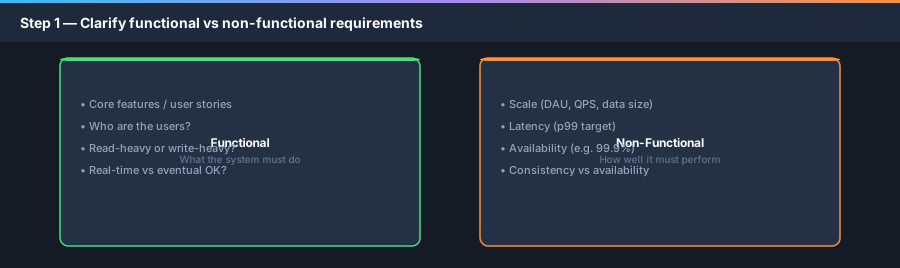
Split into functional (what it does) and non-functional (how well it must work at scale).
Write assumptions on the board: “Assuming 100M DAU, read-heavy, 99.9% availability, eventual consistency OK for analytics.”
- Functional: core features, user types (mobile/web), out-of-scope features to defer.
- Non-functional: scale (DAU/MAU), read/write ratio, latency (p99), availability, consistency needs.
- Constraints: budget, team size, existing stack, regulatory (PII, GDPR).
- Confirm: “Is this in scope for v1?” before designing login, analytics, or admin panels.
Sample questions to ask (any prompt)
- “How many daily active users should we design for?”
- “Is read or write traffic dominant?”
- “Do we need strong consistency or is eventual OK?”
- “Mobile, web, or both? Any real-time requirements?”
- “What is the acceptable latency for the main user action?”
Step 2 — Back-of-envelope estimation (~5 min)
Rough numbers prove your design can work and guide which components matter. Round aggressively — powers of 10 are fine.
If reads dominate, optimize cache and replicas. If writes dominate, focus on partitioning and write path.
- Traffic: DAU × actions/day ÷ 86400 × peak factor (2–3×).
- Storage: objects/day × size × retention.
- Bandwidth: QPS × payload size (watch video/image heavy apps).
- Call out read/write ratio — drives cache vs write-optimization.
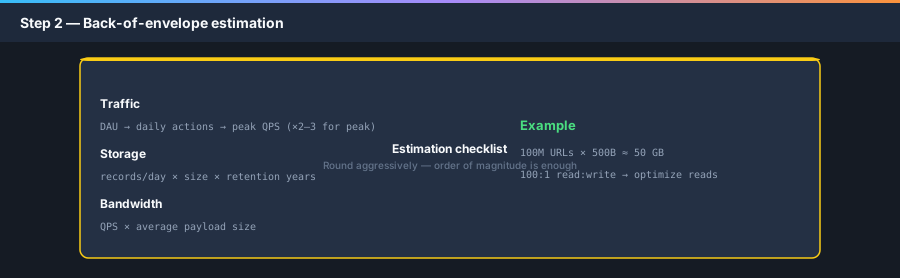
Assume: 100M new URLs/month, 100:1 read:write, 5-year retention

Writes: 100M / (30×24×3600) ≈ 40 writes/sec (~100 peak)
Reads:  40 × 100 ≈ 4,000/sec (~10K peak)

Storage: 100M × 500 bytes × 12 months × 5 years ≈ 300 GB
(order of magnitude — fits one DB + cache initially)Step 3 — API / interface design (~5 min)
Define the contract between clients and backend before drawing infrastructure. Keeps the design grounded in user actions.
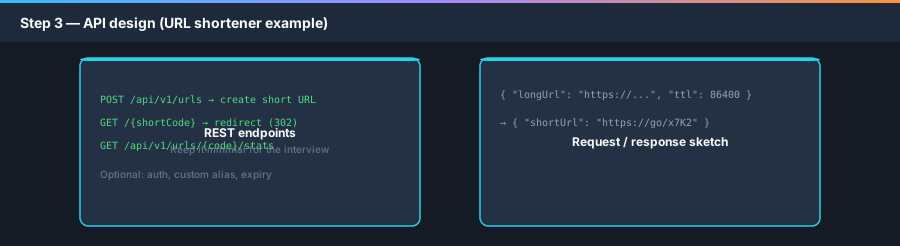
Prefer REST for interview clarity unless prompt is internal RPC/streaming. Name resources and HTTP verbs explicitly.
- List 3–5 core endpoints — not every admin or analytics API unless asked.
- Note sync vs async flows (e.g. upload → queue → worker).
- Mention idempotency on create/payment endpoints (
Idempotency-Keyheader). - For redirects:
302(temporary) vs301(permanent) — trade-off for analytics and SEO.
Step 4 — Data model (~3–5 min)
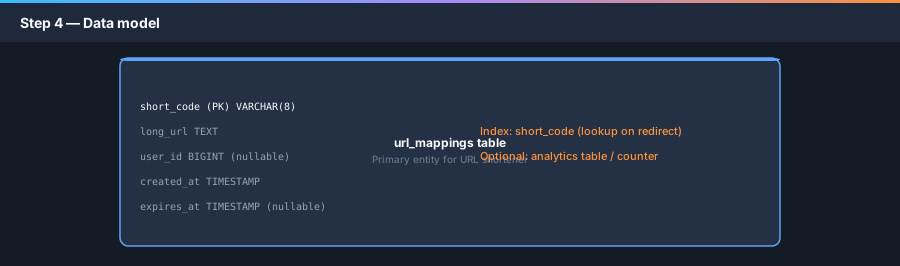
Sketch tables/documents and access patterns. Schema follows from APIs and estimation (how you query dominates SQL vs NoSQL choice).
Identify primary keys and indexes tied to hot paths (lookup by short code on every redirect).
- Relational when joins, transactions, and strong consistency on core entities matter.
- NoSQL when simple key-value access, huge scale, or flexible schema dominates.
- Separate hot path (redirect lookup) from cold path (analytics, audit logs).
- Plan indexes early — “lookup by short_code” is O(1) with PK or unique index.
Step 5 — High-level design (~10–15 min)
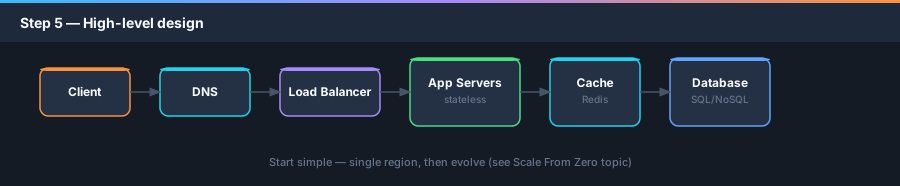
Draw one clean diagram: Client → DNS → LB → App servers → Cache → Database. Add CDN if static or redirect edge caching applies.
Start simple and correct, then mention evolution (replication, sharding) — or reference the scale journey topic.
Call out stateless app tier — session in Redis if needed; enables horizontal scale.
- Place load balancer in front of stateless app servers.
- Add cache for read-heavy hot keys (popular short URLs).
- Use DB replication when reads exceed single node or HA required.
- Introduce message queue only when async work is in scope (analytics aggregation, emails).
- Mention CDN if static assets or geographic latency matter.
Step 6 — Deep dive (~10–15 min)
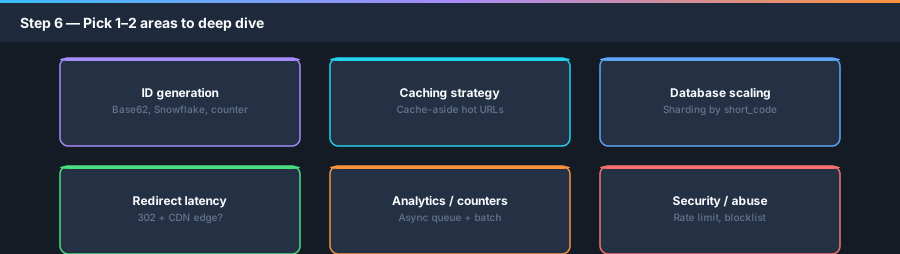
The interviewer will say: “Let’s go deeper on X.” Pick areas where correctness or scale is hardest — not the easiest box.
For URL shortener: short code generation, cache strategy, redirect hot path, or analytics at scale.
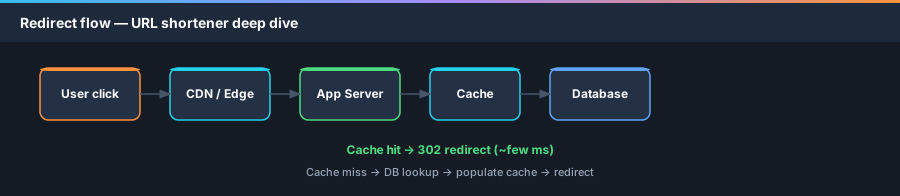
Explain data flow step-by-step; mention failure cases (cache miss, DB down, duplicate create).
Short code generation options
- Counter + Base62 — simple; single writer or range allocation per server.
- Hash of long URL — dedupe same URL; collision handling required.
- Snowflake / UUID — distributed IDs; may truncate + uniqueness check.
- Discuss collision strategy and custom alias if in scope.
Caching redirect lookups
- Cache-aside:
GET short_code→ Redis → on miss, DB → populate cache with TTL. - TTL aligned with URL expiry; evict stale entries.
- Watch cache stampede on viral links — brief lock or request coalescing.
Step 7 — Bottlenecks, trade-offs & wrap-up (~5 min)
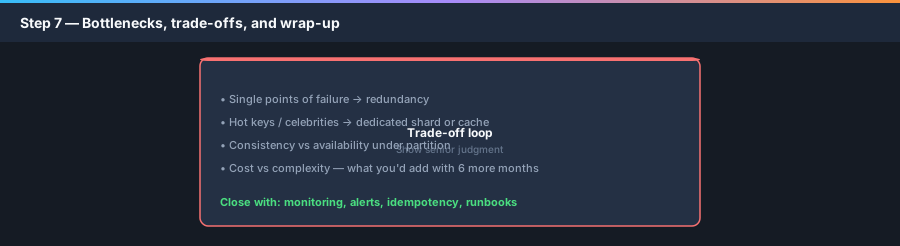
Proactively name what breaks first under 10× traffic and how you would fix it.
Show senior judgment: there is no perfect design — only fit-for-requirements choices.
Close with monitoring (latency, error rate, cache hit ratio, queue lag) and operational concerns.
- Single points of failure — LB, DB, cache; add redundancy at each tier.
- Hot keys — celebrity URLs or viral links; dedicated cache, read replicas.
- Consistency — redirect must be correct; analytics can lag (eventual).
- Security — rate limiting, abuse detection, block malicious domains.
- Future work — multi-region, sharding, custom domains, analytics dashboard.
Interview dos and don’ts
Small habits that separate strong candidates from weak ones.
- Do think aloud — silence reads as stuck.
- Do confirm assumptions before designing.
- Do draw legible boxes; label arrows (read/write, async).
- Do let the interviewer steer deep dives — collaborate, don’t monologue.
- Don’t name-drop technologies without tying to a requirement.
- Don’t skip estimation — even 2 minutes helps.
- Don’t argue every choice — explain trade-offs and move on.
- Don’t forget failure modes and monitoring.
Apply the framework to common prompts
Same 7 steps every time — only the deep-dive focus changes.
- URL shortener — ID generation, cache, redirect latency (worked example above).
- Rate limiter — token bucket, distributed counter (Redis), edge vs central enforcement.
- News feed — fan-out on write vs read, ranking, celebrity problem.
- Chat — WebSocket gateway, message store, presence, delivery guarantees.
- Notification system — queue, workers, retry/DLQ, idempotent sends.
- Paste bin / Dropbox — blob storage, metadata DB, CDN, multipart upload.
Interview Q&A
Likely Follow-up Questions
- How would this design change at 100× traffic?
- What metrics and alerts would you put on day one?
- How do you handle a regional outage?
- Walk me through a failure: cache cluster goes down.