Scale From Zero To Millions Of Users
Evolve a single-server app into a multi-region, sharded, queue-backed architecture — one step at a time.
Problem it solves
- Interviewers ask “how would you scale this?” — you need a progressive story, not a jump to Kafka and Kubernetes.
- Real systems fail when teams add complexity (sharding, queues) before solving basics (stateless tier, replication, cache).
- This chapter maps each growth stage to a concrete architecture change with a clear “why.”
Why It Matters
- The #1 system design interview pattern: start simple, identify bottlenecks, evolve architecture.
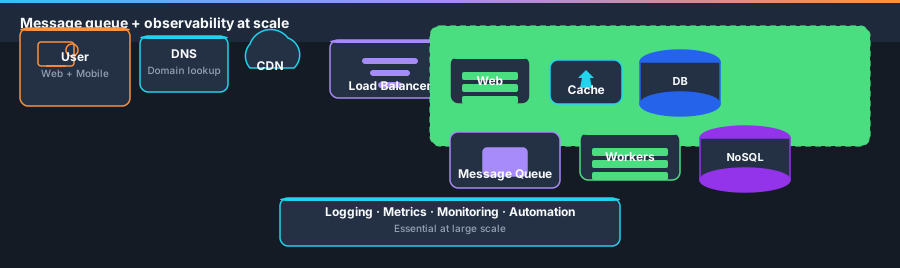
- Covers DNS → LB → replication → cache → CDN → stateless → multi-DC → MQ → sharding — the full ladder.
- Each technique connects to topics elsewhere in this guide (caching, queues, idempotency, trade-offs).
Single server setup
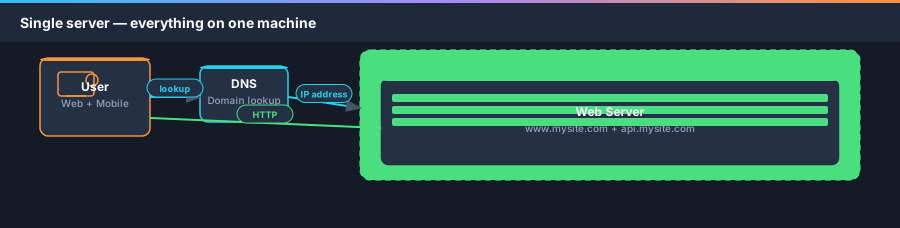
A journey of a thousand miles begins with a single step. To start simple, everything runs on one server: web app, database, cache, etc.
Traffic comes from two sources: web application (server-side + HTML/JS) and mobile application (HTTP + JSON APIs).
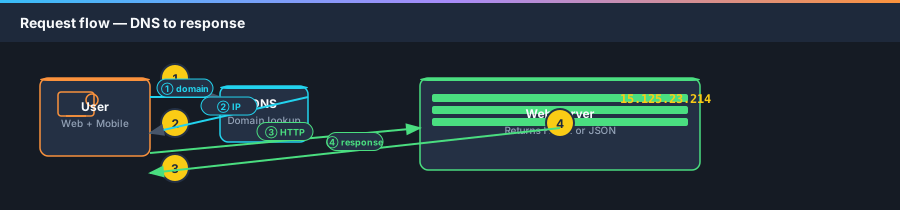
- Users access sites via domain names (e.g.
api.mysite.com). DNS is usually a 3rd-party paid service, not hosted on your servers. - DNS returns an IP address (e.g.
15.125.23.214) to the browser or mobile app. - Client sends HTTP requests directly to the web server at that IP.
- Web server returns HTML pages (web) or JSON (mobile API).
{
  "id": 12,
  "firstName": "John",
  "lastName": "Smith",
  "address": {
    "streetAddress": "21 2nd Street",
    "city": "New York",
    "state": "NY",
    "postalCode": 10021
  },
  "phoneNumbers": ["212 555-1234", "646 555-4567"]
}Separate database tier
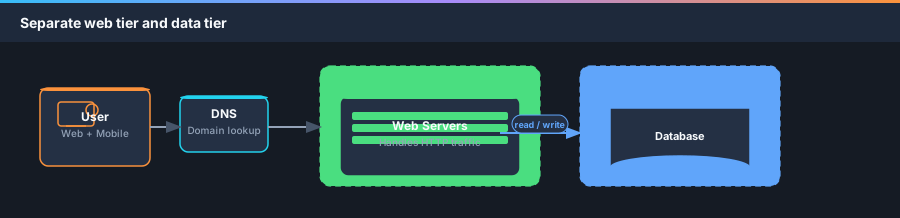
With user growth, one server is not enough. Split web/mobile traffic (web tier) from database (data tier) so each scales independently.
Which database to use?
Relational (MySQL, PostgreSQL) vs non-relational (DynamoDB, Cassandra, etc.). Relational DBs use tables/rows and SQL joins. NoSQL groups into key-value, graph, column, and document stores — generally no joins.
- Relational is the default for most apps — 40+ years of proven patterns.
- Choose NoSQL when you need super-low latency, unstructured data, simple serialize/deserialize (JSON), or massive scale.
Vertical scaling vs horizontal scaling
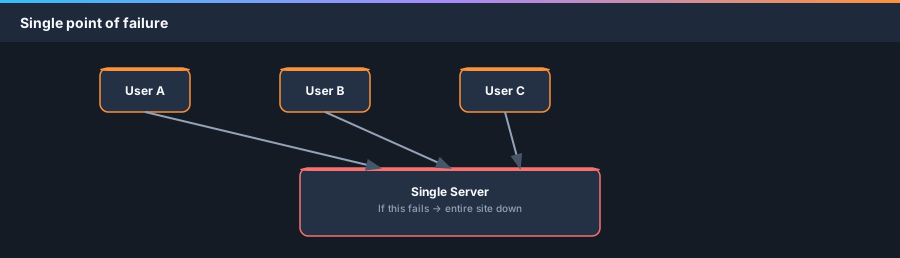
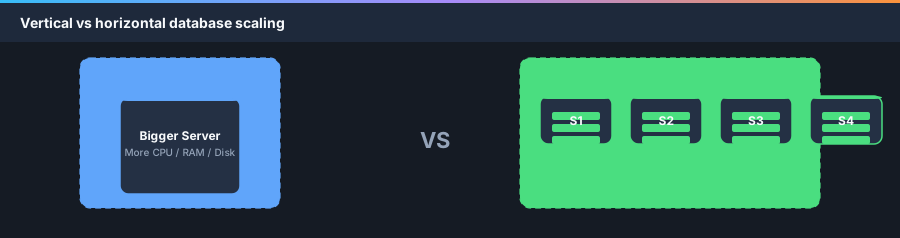
Vertical scaling (scale up) — add CPU, RAM, disk to one server. Simple when traffic is low, but has a hard hardware ceiling and no failover.
Horizontal scaling (scale out) — add more servers. Required at large scale; load balancer addresses web-tier availability next.
- Vertical: simple, but single server = single point of failure.
- Horizontal: more desirable for large apps — add servers to the pool.
Load balancer
If users hit the web server directly, one offline server takes down the site. If traffic spikes, users see slow responses or connection failures.
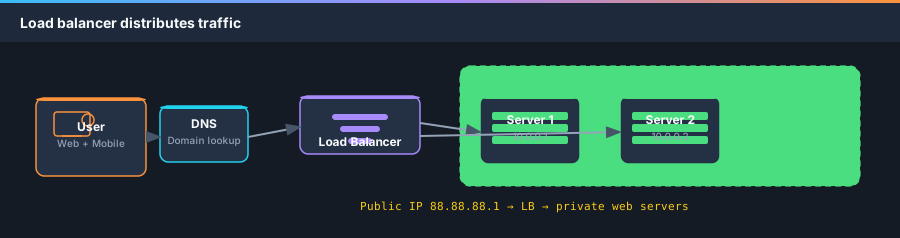
A load balancer distributes incoming traffic across a pool of web servers. Users connect to the LB public IP; servers use private IPs (not reachable from internet).
- If Server 1 goes offline, traffic routes to Server 2 — site stays up. Add healthy servers to rebalance.
- If traffic grows, add more servers to the pool — LB sends requests automatically.
Database replication
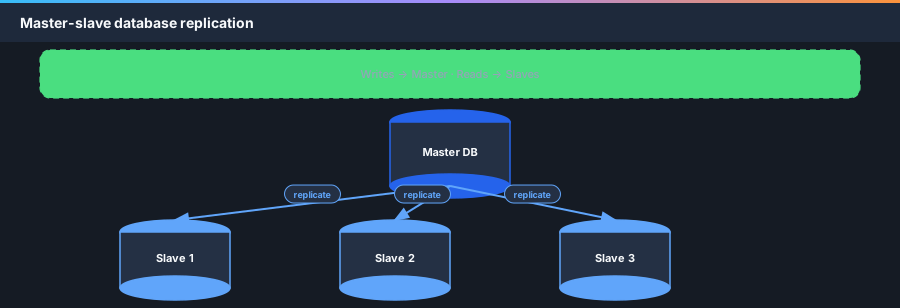
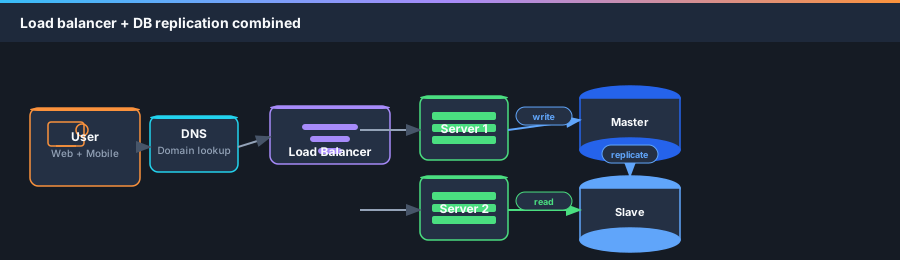
Web tier now has failover via LB. The data tier still has a single DB — no redundancy. Database replication uses master/slave: master handles writes; slaves replicate data and handle reads.
Most apps are read-heavy → typically more slaves than masters.
- Better performance — writes on master; reads parallelized across slaves.
- Reliability — data replicated across locations; disaster recovery.
- High availability — if one DB is offline, read from another replica.
- Slave offline → reads temporarily to master; replace slave. Master offline → promote slave (data recovery may be needed in production).
- User gets LB IP from DNS → connects to load balancer.
- HTTP request routed to Server 1 or Server 2.
- Web server reads from a slave database.
- Web server writes/updates/deletes go to the master database.
Cache
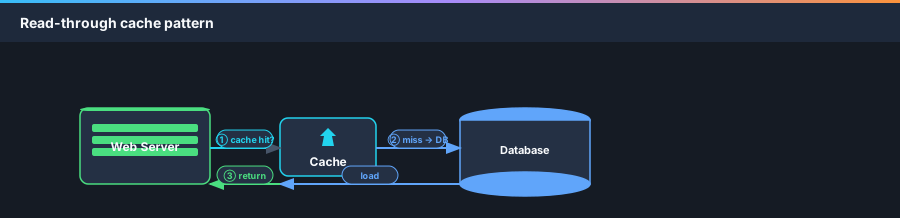
Every page load can trigger multiple DB calls. A cache stores expensive or frequent responses in memory for faster subsequent reads.
Cache tier is faster than DB and scales independently. Strategy shown: read-through cache — check cache first, on miss query DB, store in cache, return.
SECONDS = 1
cache.set('myKey', 'hi there', 3600 * SECONDS)
cache.get('myKey')
Considerations for using cache
- Use when data is read frequently, modified infrequently. Cache is volatile — not for sole persistence.
- Expiration policy — not too short (DB hammering) or too long (stale data).
- Consistency — cache and DB updates are not one transaction; harder across regions.
- Mitigate SPOF — multiple cache servers across DCs; over-provision memory buffer.
- Eviction — when full, LRU is most common; also LFU or FIFO.
Content delivery network (CDN)
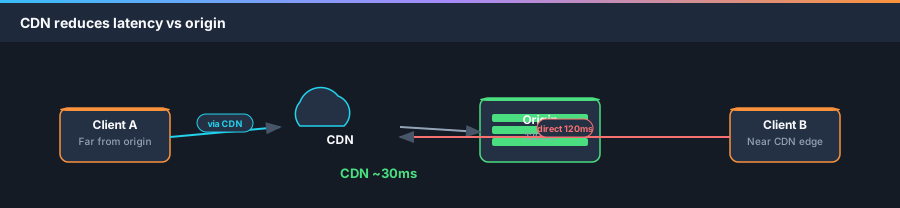
A CDN is a geographically dispersed network of edge servers that cache static content (images, CSS, JS, video). Closest edge to the user delivers content — lower latency.
This section focuses on static CDN caching (dynamic CDN is a separate advanced topic).
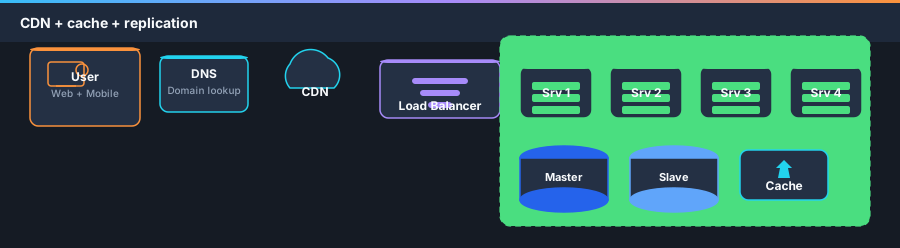
- Static assets no longer served by web servers — fetched from CDN.
- Database load further reduced by caching hot data.
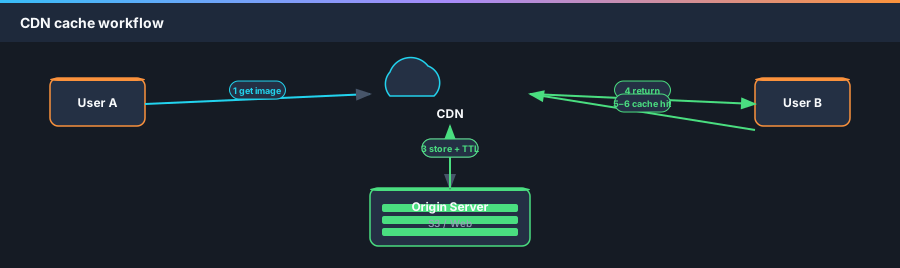
- User requests
image.pngfrom CDN URL (e.g.mysite.cloudfront.net/logo.jpg). - CDN miss → fetches from origin (web server or S3).
- Origin returns file + optional TTL header.
- CDN caches and returns to User A.
- User B requests same image — served from cache if TTL valid.
Considerations for using CDN
- Cost — pay for data transfer; don’t CDN-cache rarely used assets.
- Cache expiry — balance freshness vs origin reload frequency.
- CDN fallback — app must request from origin if CDN is down.
- Invalidation — CDN vendor APIs or object versioning (
image.png?v=2).
Stateless web tier
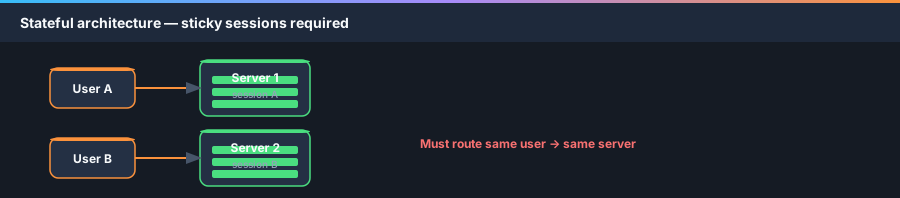
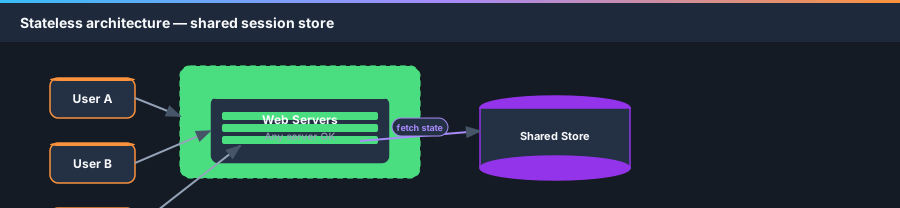
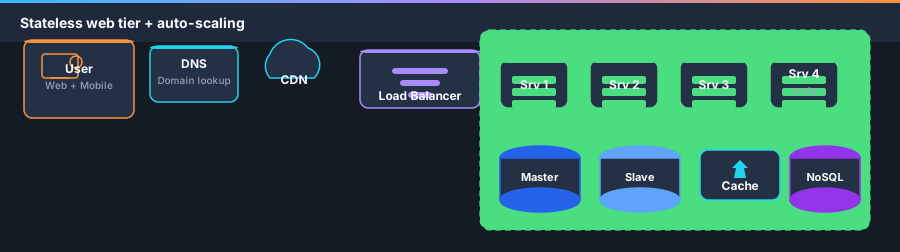
To scale web tier horizontally, move session state out of web servers into shared persistent storage (DB, Redis, Memcached, NoSQL). Any server can serve any user.
Stateful vs stateless
- Stateful — server remembers client data; requires sticky sessions; hard to add/remove servers and handle failures.
- Stateless — any web server can handle any request; fetches state from shared store; simpler, robust, auto-scalable.
Multi data center
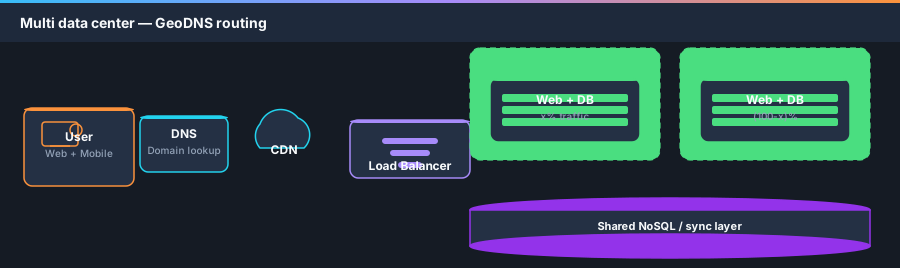
International growth requires multiple data centers for availability and lower latency. GeoDNS resolves domain to IP based on user location (e.g. x% US-East, (100−x)% US-West).
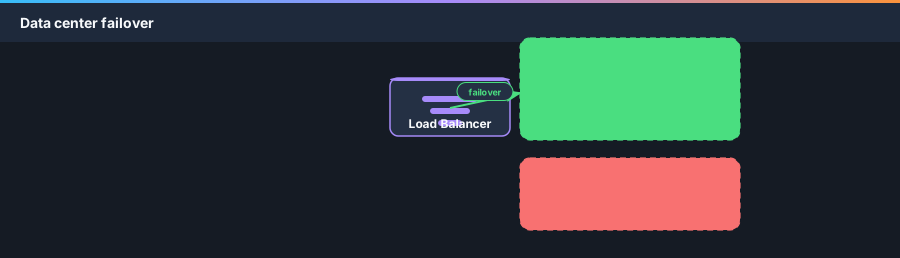
On DC outage, route 100% traffic to the healthy region.
- Traffic redirection — GeoDNS to nearest DC.
- Data synchronization — replicate across DCs; failover needs data available in target region.
- Test and deployment — automate deploys consistently across all DCs.
Message queue
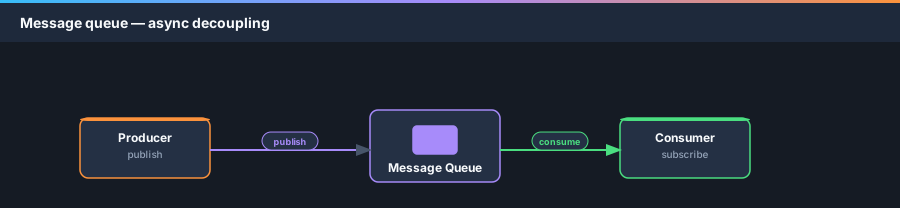
Decouple components so they scale independently. A message queue buffers async messages: producers publish, consumers subscribe and process.
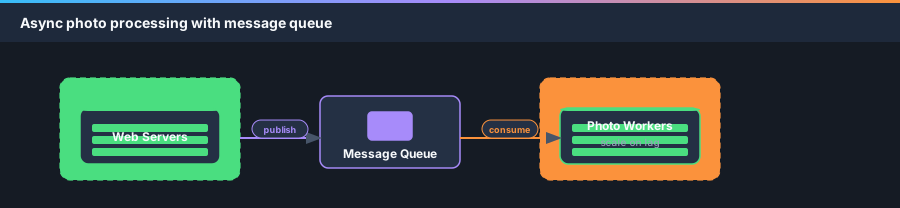
Example: photo customization (crop, blur) is slow — web servers publish jobs; worker pool consumes asynchronously. Scale workers when queue depth grows.
Logging, metrics, automation
At small scale, logging/metrics/automation are nice-to-have. At millions of users, they are essential.
- Logging — aggregate error logs centrally for search and alerting.
- Metrics — host (CPU, memory, disk I/O), aggregated tier health, business KPIs (DAU, revenue).
- Automation — CI on every check-in; automate build, test, deploy.
Database scaling — sharding
Vertical DB scaling (bigger machine) hits limits and SPOF risk — Stack Overflow ran one master in 2013, but that is not the default path for hypergrowth.
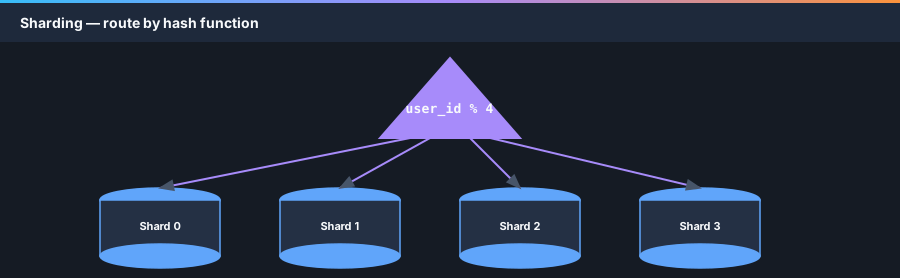
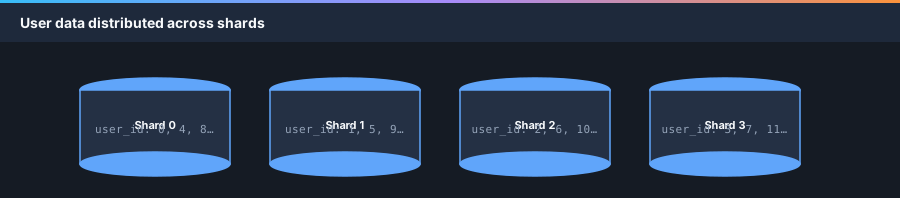
Horizontal scaling (sharding) splits one DB into shards — same schema, unique data per shard. Route by sharding key (e.g. user_id % 4).
Sharding challenges
- Resharding — when a shard is full or uneven; use consistent hashing.
- Celebrity / hotspot problem — one shard overloaded; dedicate shards or partition further.
- Joins — cross-shard joins are hard; denormalize for single-table queries.
- Move some workloads to NoSQL to reduce relational DB load.
Millions of users and beyond
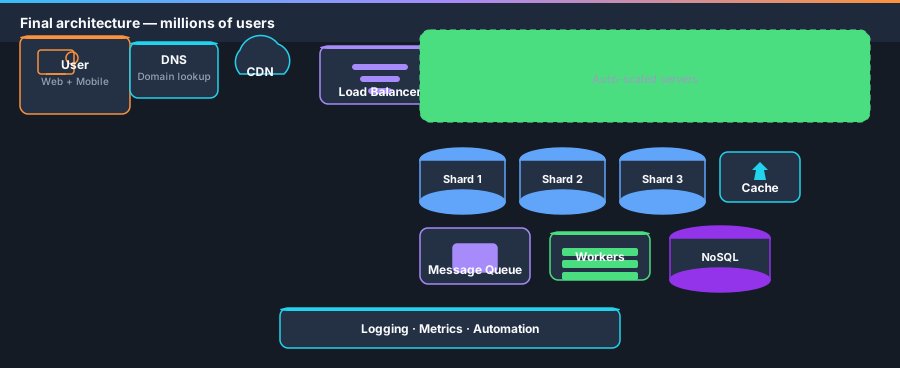
Scaling is iterative. To support millions of users, combine these principles:
- Keep the web tier stateless.
- Build redundancy at every tier.
- Cache data as much as you can.
- Support multiple data centers.
- Host static assets on CDN.
- Shard the data tier horizontally.
- Split tiers into individual services.
- Monitor and use automation tools.